What is KDS? (Kitchen Display System Explained)
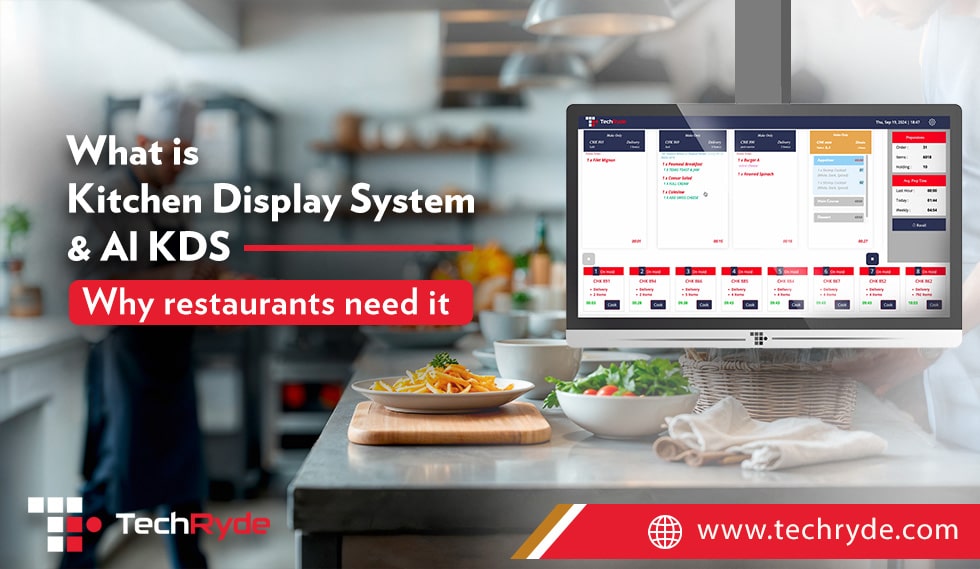
The full form of KDS is Kitchen Display System. A KDS is a digital screen that displays order item details in the kitchen after the order is placed. It connects and syncs to your POS, so every order shows up in the kitchen instantly without any discrepancy.
It is the modern upgrade from a primitive ticket printer system previously used in restaurants where each order details where printend on a paper ticket and then manually transported to the kitchen.
Using a KDS means no manual re-entry, less confusion, fewer mistakes, and even greater order turnaround time. Instead of thinking about what is next and juggling printed order tickets, the kitchen team follows a clearly mapped sequence of orders that is automatically updated and displayed by the KDS.
As the report from Data Insights Market emphasizes, the adoption of KDS software is accelerating as restaurants increasingly recognize its ability to boost operational efficiency, reduce labor costs, and enhance profitability.
Many restaurants today are switching to a AI kitchen display system to manage orders faster and reduce errors in the kitchen. A modern kitchen display system for restaurants helps chefs track orders in real time and improves kitchen workflow. If you want to see how an advanced solution works, explore this AI kitchen display system for restaurants.
What is an AI-Powered Kitchen Display System & How is it Different?
An AI-powered Kitchen Display System or AI KDS does more than just track and display orders on a screen. The system can track and analyze how long dishes take to cook, when the order needs to be prepared, the urgency level, how busy the kitchen is, and multiple other factors.
Then the AI system uses these factors to help the kitchen work at peak efficiency by managing the kitchen workload, sequencing orders intelligently, and communicating order updates with staff & customers.
The system can easily decide the best way to manage all incoming orders, even in rush hours.
Furthermore, the AI kitchen display system even projects a delivery promise time for delivery customers, taking into account the kitchen status and live weather & traffic conditions, enhancing customer experience. Meaning coustomer exactlty know how much time the order will take to reach them and not just receive a generic 30-45 min delivery time.
Beyond boosting speed and accuracy, today’s AI-powered KDS also acts like a data hub. It records all order details and can give insights into peak hours, prep times, and even ingredient usage, which can be used to forecast demand more accurately.
What Are the Benefits of AI-Powered KDS for Restaurants?
The following are the benefits of using an AI-powered kitchen display system in your restaurant:
1. Faster Service: Paper tickets slow things down. AI KDS shows the kitchen exactly what to do next. Orders are sorted by time, priority, and type and displayed at the designated stations; chefs don’t need to think about what to cook next or organise paper tickets.
2. Keeps Customers Informed (During Online Delivery): AI KDS automatically updates online order statuses for customers, such as received, cooking, ready for pickup, or out for delivery, through channels like apps, text alerts, or websites. Reducing customer frustration and building trust.
3. Lower Labor Costs: Busy hours often need more staff. But with AI KDS, staff can do more without rushing, as it removes most of the manual & re-entry work from the equation. This helps the team stay focused on more important tasks and saves money, especially beneficial for small businesses that are usually understaffed.
4. Fewer Mistakes: Mistakes cost money and upset customers. AI KDS tracks every order and shows every order detail without any discrepancy. That helps keep the food right every time, down to each modifier and the guests happy, especially leading to fewer cancelled orders and customer complaints.
5. Reliable Experience: Guests want good service every time. Whether they order online or dine in, AI KDS helps make sure the food is ready fast, and customers have a consistent experience.
6. Communicates Accurate Delivery Promise Times: By analyzing current kitchen workload, prep times, and order complexity, the system can predict when an order will be ready & delivered and then communicate this to customers. This not only manages expectations but also increases trust and satisfaction, as guests receive their food when promised, every time.
A modern KDS doesn’t just work for big restaurant chains & QSRs. Fine dining venues use it to pace multi-course meals, while ghost kitchens rely on it to juggle multiple delivery orders without mix-ups, and small-scale restaurants use it to fill the staff gap. This is another place where restaurant operators realize the difference between simply asking what KDS is and truly understanding how it transforms the kitchen’s daily workflows.
Kitchen Display System Market Trend
The global kitchen display system market is rapidly expanding as restaurants move away from outdated paper tickets and embrace digital transformation. According to recent kitchen display system market analysis, the demand is being driven by:
- Rising Online Ordering & Delivery Apps: With platforms like Uber Eats and DoorDash fueling order volumes, restaurants need real-time visibility in their kitchens.
- Labor Shortages in Hospitality: Restaurants are adopting KDS to do more with fewer staff while maintaining service speed.
- AI & Automation Adoption: The shift toward AI-driven kitchen display system market trends shows restaurants want predictive insights, not just digital screens.
- Omnichannel Integration: Customers now expect consistency across dine-in, takeout, and delivery, which fuels growth of integrated KDS solutions.
Industry reports highlight that the US kitchen display system market will continue to grow steadily over the next few years, driven by efficiency needs, cost control, and rising customer expectations for speed and accuracy.
Traditional KDS Vs. AI KDS (KDSync by TechRyde) |
||
Feature |
Traditional KDS |
TechRyde AI KDSync |
Prep Time Management |
Manual & static, follows one standard order sequencing | Intelligent AI sequences orders by cook time + priority + kitchen load & more |
Order Routing |
Basic kitchen first-in, first-out ticket flow | AI-driven routing based on resource availability & prep time |
Device Compatibility |
Limited to specific hardware | Extensive hardware compatability (supports your preexisting device) |
Real-Time Order Status |
Rarely available | Live updates & alerts for both staff and customers. |
System Integration |
May or may not support | Integrates with POS, website and 3rd delivery apps (Uber Eats, DoorDash, etc.) |
Resource Optimization |
Rarely available | Syncs kitchen load with staff schedules, order priority & equipment capacity |
Scalability |
Fixed for certain formats (e.g., dine-in or online order only) | Flexible enough QSRs, hotels, fine dining, ghost kitchens, multi-location chains and more |
Ease of Use |
Learning curve, limited UX | User-friendly interface, minimal training required |
Data Insights |
Limited analytic | Real-time performance dashboards: prep times, waste, staff output and more |
What is The Difference Between a KMS and a KDS?
While the terms are often used interchangeably, a Kitchen Display System (KDS) and a Kitchen Management System (KMS) are not the same:
What is a Kitchen Display System (KDS)?
- Primarily a digital order display tool that replaces traditional paper tickets.
- Focuses on showing, tracking, and sequencing orders on kitchen screens.
- Ensures smoother communication between front-of-house, delivery apps, and kitchen staff.
Whats is Kitchen Management System (KMS)?
- A broader solution that includes KDS features but goes further.
- Manages kitchen workflows, staff allocation, food prep tracking, inventory usage, and performance analytics.
- Often integrates with other restaurant systems (POS, inventory, scheduling, reporting, and more).
In short, a KDS can be called a component of a KMS.
To Sum It Up
At its core, a Kitchen Display System (KDS) is simply a digital upgrade for old paper tickets and kitchen printers. Instead of chefs relying on printed slips or shouted orders, the KDS shows every order on a screen in real-time, maximizing accuracy & efficiency. It’s a smarter way to display and manage orders in the kitchen. An AI-powered KDS takes this one step further. It doesn’t just show orders. It thinks about them and helps the kitchen and staff do their best.
Frequently Asked Questions (FAQs)
Q1. What does KDS stand for?
KDS stands for Kitchen Display System. It’s a digital screen that displays, manages, and tracks food orders in real time in the kitchen.
Q2. How much does a KDS typically cost?
A KDS usually involves two costs:
Screens/Hardware: Around $200–$1000 per screen, depending on size and brand.
Software: Providers charge either a one-time fee or a subscription fee. For example, TechRyde offers AI KDS software (plus the entire restaurant operations tech stack) for $150 per location per month.
Q3. What is a KDS in restaurants?
In a restaurant, a KDS or Kitchen Display System connects the front-of-house with the kitchen. It displays, organizes, and routes orders to the right stations, ensuring smooth order flow.
Q4. How does KDS work?
A customer places an order at the counter, food delivery app, or by any other means, and it first reaches the POS (Point-of-Sale). The order is then injected into the kitchen display system and displayed in the kitchen. Staff can then see, update, track, and mark orders completed in real time via KDS.
Q5. What is an AI-powered KDS?
An AI-powered Kitchen Display System (AI KDS) uses artificial intelligence to organize & manage orders and balance kitchen load in the kitchen instead of just displaying orders. Furthermore, instead of displaying orders in the sequence they are received, it analyzes factors such as preparation time, item complexity, priority, and kitchen load to prioritize and sequence orders efficiently.
This helps kitchens reduce preparation delays, improve workflow coordination, minimize errors, and ensure faster, more consistent order fulfillment, especially during peak hours.